
MAGI-2 vs Seedance 2.5
Different strengths. One creative decision.
MAGI-2 vs Seedance 2.5: compare official video capabilities, native audio, reference controls and editing workflows. Find the right fit for the story you want to tell.
Character & motion
MAGI-2 vs Seedance 2.5
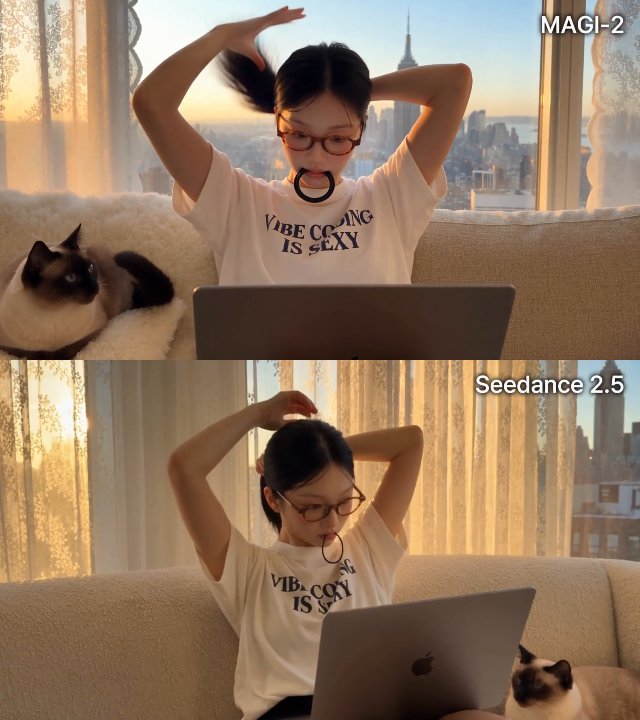
Architecture & camera
MAGI-2 vs Seedance 2.5
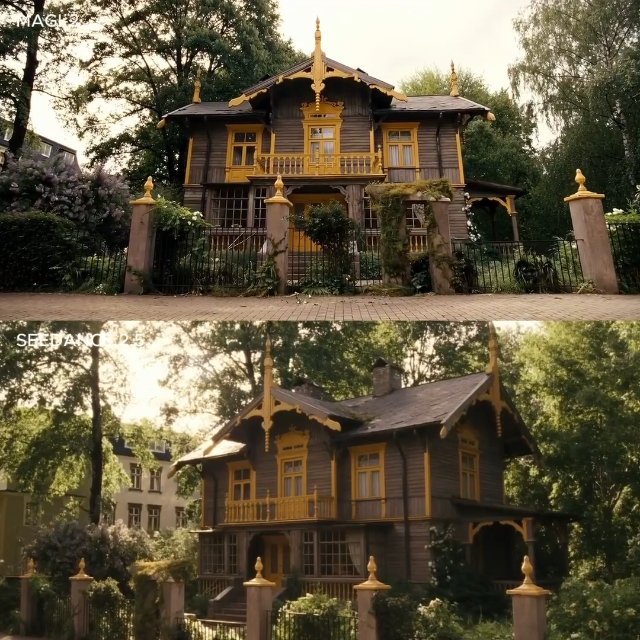
Silent previews. Model names are labeled inside each split-screen clip.
THE ESSENTIALS
MAGI-2 vs Seedance 2.5 at a glance
Both models generate video with sound and accept multiple types of reference material. Output options and creative controls are the useful starting points when deciding between them.
| Capability | MAGI-2Sand AI | Seedance 2.5ByteDance Seed |
|---|---|---|
| Developer | MAGI-2Sand AI | Seedance 2.5ByteDance Seed |
| Single generation | MAGI-2Up to 30 seconds | Seedance 2.5Up to 30 seconds |
| Output resolution | MAGI-21080p | Seedance 2.5480p, 720p, 1080p and 4K |
| Documented frame rate | MAGI-225 fps | Seedance 2.524 fps |
| Native audio | MAGI-2Supported | Seedance 2.5Supported |
| Reference images | MAGI-2Up to 10 | Seedance 2.5Up to 30 |
| Reference videos | MAGI-2Up to 5 | Seedance 2.5Up to 10 |
| Reference audio clips | MAGI-2Up to 5 | Seedance 2.5Up to 10 |
| Creative controls | MAGI-2Timeline, shot cuts and video editing | Seedance 2.5Editing, extension, clay-render and green-screen workflows |
Scope: full MAGI-2 and standard Seedance 2.5, not MAGI-2 Preview or Seedance Flash. These are model and API capabilities; hosting platforms may expose a smaller feature set.
PICTURE & SOUND
Video resolution, duration and native audio
Begin with the format your finished project needs. MAGI-2 is documented at 1080p and 25 fps. Standard Seedance 2.5 offers a wider output range, including 4K at the model level. Both support a single generation of up to 30 seconds.
Both also support synchronized audio-video generation. Describe the spoken line, ambient sound and action together. Audio support alone does not establish which model has better lip sync or sound quality; compare relevant outputs before choosing.
Choose your delivery format first. If 4K is a requirement, verify that your chosen Seedance platform exposes it. If you are publishing in 1080p, evaluate the scene itself rather than treating a resolution label as a quality score.
DIRECT THE DETAILS
Image, video and audio reference controls
A reference can establish a character, a location, a camera move or a sound. Give each asset a specific job instead of expecting a larger upload to explain the scene on its own.
Images
Appearance, composition and visual style.
Videos
Motion, framing and cinematic direction.
Audio clips
Sound and performance references.
Counts are per-request upper limits, not a guarantee that any combination of files is valid. File sizes, combined duration, content rules and task-specific requirements still apply. Check the API guide before preparing a large reference set.
BEYOND THE FIRST TAKE
Video editing and extension capabilities
Plan the sequence with MAGI-2
Sand AI demonstrates timeline and shot-cut control as well as edits to existing footage. For a directed scene, write the order of events, camera position and intended transitions clearly. Confirm that the platform you use exposes the relevant controls.
Build on a scene with Seedance 2.5
ByteDance documents timestamp-level editing, extension and workflows involving clay renders and green screens. These are useful capabilities to evaluate if your process begins with an existing sequence or a structured production reference.
This is a comparison of documented workflows, not a claim that every editing feature is available in the magi-2.pro generator.
READING THE COMPARISONS
What to look for in the video comparisons
The two supplied split-screen clips at the top of this page show both models in motion. Use the embedded model labels to follow each result, then look beyond a single frame.
Character & motion
Follow the hands, face and clothing as the subject moves. Look for changes in appearance and whether the scene remains coherent from beginning to end.
Architecture & camera
Watch how the building, railings and trees hold their structure as the camera changes position. Compare framing, perspective and the continuity of small details.
These clips were supplied for this page. Their original prompts and generation settings were not provided, so they are visual examples rather than a controlled quality benchmark.
MAKE IT FIT YOUR PROJECT
Which model fits your creative workflow?
You want to start
creating in 1080p.
Put MAGI-2 on your shortlist when its output format and reference capacity match your brief. Start with a clear prompt, or use an image to establish your subject, then judge whether the result tells the story you intended.
Try MAGI-2You need more input
or output flexibility.
Evaluate standard Seedance 2.5 when 4K, a larger reference set or an extension workflow is central to your project. Check the exact model variant and platform controls before committing your assets.
These recommendations follow the documented specifications. For dialogue, product details or complex movement, compare representative results; a larger reference limit does not prove better image quality.
A FEW MORE DETAILS
Frequently asked questions
What is the difference between MAGI-2 and Seedance 2.5?
Both support audio-video generation and multimodal references. The clearest documented differences are output options, reference capacity and editing workflows. Start with the specifications above, then use relevant examples to judge whether a model fits your project.
Do MAGI-2 and Seedance 2.5 generate videos with audio?
Yes. Both document synchronized audio-video generation. Describe the dialogue, sound effects and atmosphere you want, and check that audio generation is enabled in the platform you use.
Which model supports 4K video output?
The BytePlus model list includes 4K for standard Seedance 2.5. The Sand AI API currently documents 1080p for MAGI-2. Availability can differ across hosting platforms and model variants.
Which model accepts more reference images and videos?
Standard Seedance 2.5 has the larger documented reference capacity. Check the table for counts and check your provider’s API documentation for file size, duration and task-specific restrictions before preparing your assets.
Can I use MAGI-2 for image-to-video generation?
Yes. You can start with an image and describe the action and camera movement. On magi-2.pro, open the homepage generator and select an available MAGI-2 image or reference mode. The current controls show which inputs are supported.
Can I try both models on this website?
magi-2.pro currently offers MAGI-2; Seedance 2.5 is not available in our public generator. The Try MAGI-2 buttons take you to the homepage generator. Seedance 2.5 requires a separate service that supports the model.
YOUR NEXT SCENE STARTS HERE
Bring your idea into motion.
Open the homepage generator and choose MAGI-2 in the model menu, then explore the available text, image and reference modes.
Try MAGI-2 on the homepagemagi-2.pro is an independent generation service. Seedance 2.5 is not currently offered in our public generator.